Topology Visualization with Graphite
A combination of netreplica nrx and graphite tools can be used to visualize NetBox topology data.
Why Graphite?
Unlike typical plugin-based visualizers, this method:
- Works with a standard NetBox instance without any plugins installed
- Doesn't require administrative access to the NetBox host
- Provides interactive, web-based topology visualization
- Supports multiple layout algorithms
- Allows easy topology sharing and presentation
Prerequisites
- Docker installed
- NetBox API access with a valid token
- nrx installed and configured
Step 1: Export from NetBox
Export topology data from NetBox in the Graphite format:
export NB_API_TOKEN='replace_with_valid_API_token'
nrx --api https://demo.netbox.dev \
    --site DM-Akron \
    --templates templates \
    --output graphite
This creates:
DM-Akron/DM-Akron.graphite.json- Graphite topology file
Command Options
--api- NetBox API URL--site- NetBox site to export--templates- Path to template directory--output graphite- Export in Graphite format
Step 2: Start Graphite
Start Graphite to visualize the topology:
TOPOLOGY="$(pwd)/DM-Akron/DM-Akron.graphite.json"
docker run -d -t --rm \
    --mount type=bind,source="${TOPOLOGY}",target=/htdocs/default/default.json,readonly \
    -p 8080:80 \
    --name graphite \
    netreplica/graphite:latest
Access the Visualization
Open http://localhost:8080/graphite in your browser to see the topology.
Remote Access
If you're running Graphite on a remote host or inside a VM, use this helper to show the working URL:
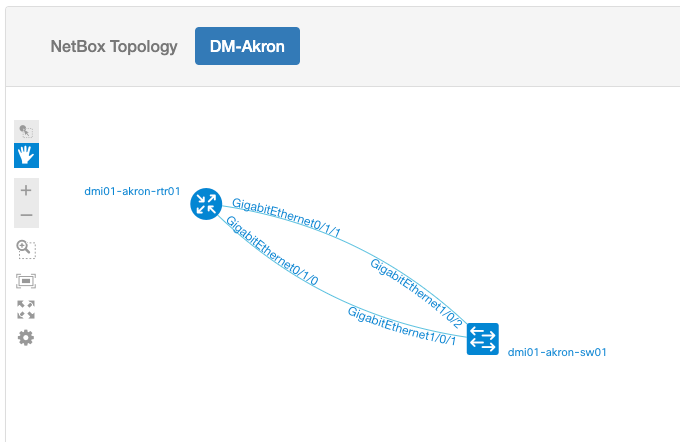
Example Visualization
The visualization will show:
- Nodes - Devices from NetBox with roles, names, and metadata
- Edges - Connections between devices
- Layout - Hierarchical arrangement based on device roles
- Interactivity - Zoom, pan, select, and inspect elements
Step 3: Stop Graphite
When done, stop the Graphite container:
Working with Multiple Topologies
If you'd like to switch between multiple exported topologies without restarting Graphite:
Method 1: Volume Mount
Mount a directory containing multiple topology files:
docker run -d -t --rm \
    --mount type=bind,source="$(pwd)/topologies",target=/htdocs/topologies,readonly \
    -p 8080:80 \
    --name graphite \
    netreplica/graphite:latest
Access topologies at: * http://localhost:8080/graphite?topology=DM-Akron.graphite.json * http://localhost:8080/graphite?topology=DM-Albany.graphite.json
Method 2: Multiple Instances
Run multiple Graphite instances on different ports:
# Topology 1 on port 8080
docker run -d -t --rm \
    --mount type=bind,source="$(pwd)/DM-Akron/DM-Akron.graphite.json",target=/htdocs/default/default.json,readonly \
    -p 8080:80 \
    --name graphite-akron \
    netreplica/graphite:latest

# Topology 2 on port 8081
docker run -d -t --rm \
    --mount type=bind,source="$(pwd)/DM-Albany/DM-Albany.graphite.json",target=/htdocs/default/default.json,readonly \
    -p 8081:80 \
    --name graphite-albany \
    netreplica/graphite:latest
Advanced Usage
Export Multiple Sites
# Export multiple sites
nrx --api https://demo.netbox.dev \
    --sites "site1,site2,site3" \
    --output graphite \
    --dir multi-site
Filter by Tags
Custom Styling
Graphite supports custom styling of nodes and edges based on metadata. See Graphite documentation for details on customization.
Graphite Features
Layout Algorithms
Graphite supports multiple layout algorithms:
- Hierarchical - Top-down based on device roles (default)
- Force-directed - Physics-based automatic layout
- Circular - Nodes arranged in a circle
- Grid - Regular grid arrangement
Interaction
- Zoom - Mouse wheel or pinch gesture
- Pan - Click and drag
- Select - Click on nodes or edges
- Info - View detailed metadata in side panel
Export
- PNG - Export current view as image
- Share - Generate shareable links
- Embed - Get embed code for presentations
Integration with CI/CD
Graphite visualization can be integrated into CI/CD pipelines:
# Generate topology visualization as part of documentation build
nrx --api $NB_API_URL \
    --site production \
    --output graphite \
    --dir docs/topologies

# Serve with static site generator
Troubleshooting
Empty Visualization
If Graphite shows an empty canvas:
- Check that the JSON file was created correctly
- Verify the file path in the Docker mount command
- Check browser console for errors
Port Already in Use
If port 8080 is already in use:
# Use a different port
docker run -d -t --rm \
    --mount type=bind,source="${TOPOLOGY}",target=/htdocs/default/default.json,readonly \
    -p 8888:80 \
    --name graphite \
    netreplica/graphite:latest
Debug Mode
Enable debug output when exporting:
Alternative: D2 Format
nrx also supports exporting to D2 declarative diagram language:
D2 files can be rendered to SVG or PNG using the D2 CLI tool.
Next Steps
- Graphite Documentation - Learn more about Graphite
- Containerlab Example - Deploy labs from visualized topologies
- Platform Map - Customize node appearance
- Templates - Customize visualization output